Overview
Dynamic Planner uses a consistent domain model across its Open APIs. Understanding these core objects — Clients, Relationships, Employees and Organisation Units — is essential when integrating with CRM, Client Profiling, Tracking, Finances or Event‑based (PubSub) APIs.
The high‑level data model includes:
- Organisation Units (OUs) — define firm hierarchy, visibility rules and ownership boundaries.
- Clients — individuals or joint clients receiving financial advice.
- Relationships — represent personal or business connections between clients.
- Employees — adviser firm staff; all API calls operate in their context.
- Arrangements — financial products within Finances or Tracking APIs.
- Profiling — risk level and preference‑related data.
- Subscriptions & Events — notifications for downstream systems.
These entities appear consistently across Swagger definitions and Dynamic Planner service areas.
Clients, Relationships & Self‑Relationships
A Client represents an individual person receiving advice. At minimum, name and date of birth are required. Additional optional attributes include:
- Contact details (address, phone, email)
- Documents uploaded or generated by Dynamic Planner
- Financial circumstances such as investments, incomes and expenditures
Relationships connect two Clients — for example “Marriage” or “Business Partnership”. Rules:
- A Relationship contains exactly two Clients.
- Two Clients may only have one Relationship between them.
Certain parts of Dynamic Planner operate using Relationships only. To support single‑client scenarios, every Client also has a Self‑Relationship, automatically created and always containing only that Client.
Employees
An Employee is any user of the adviser firm — adviser, paraplanner, administrator, etc.
API calls always operate in the context of an Employee via the employeeId claim in the access token.
For interactive logins (Hybrid Flow) or service‑account integrations (Client Credentials Flow), the token always designates an Employee.
Employees may act as Relationship Managers for Client Relationships or Self‑Relationships. When a new Client is created and the Relationship Manager is not specified, the Employee from the access token becomes the default Relationship Manager.
Organisation Units
An Organisation Unit (OU) represents adviser‑firm structure — a whole firm, a branch, a team, or even a single adviser. OUs determine:
- Which entities (Clients, Arrangements, Documents) a consumer can see
- Configuration inheritance (e.g., firm‑wide vs office‑level)
- Security boundaries and access control
All access tokens include an ouid claim identifying the caller’s Organisation Unit.
The API uses this to enforce visibility rules.
Organisation Unit Hierarchy
OUs are arranged in a nested hierarchy. Parent OUs contain child OUs, forming a structured representation of the firm or network. This hierarchy governs:
- Configuration inheritance
- Entity visibility (access to child OU data)
- Auditing and permissions
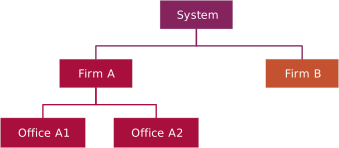
Configuration Inheritance
Many configuration items are linked to specific OUs. If an item is not configured on a given OU, the system searches upward through parent OUs until a value is found.
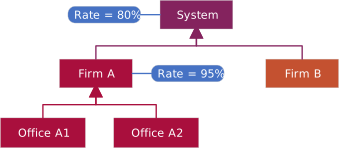
Each OU has a unique Path Identifier used as a stable key for storing configuration.
The token includes the full OU Path (oupath) to describe its location in the hierarchy.
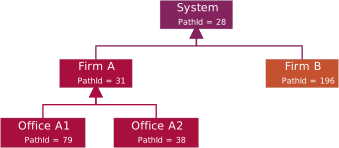
Only the last identifier in oupath should be used as a key, because the full path may change if
the OU is moved.
Entity Visibility
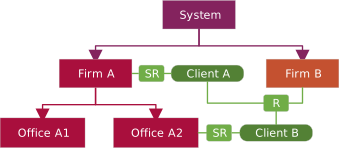
A caller can access only entities linked to:
- The OU in their access token
- Its child OUs
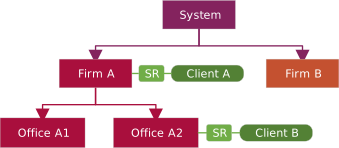
When Relationships exist between Clients, the visibility rules apply accordingly:
Business Processes & Business Process Instances
Dynamic Planner organises adviser workflows into Business Processes. Examples include:
- Client Review
- Client Profiling
- Recommendation
- Cash Flow
- Product Research
When such a process begins, the system creates a Business Process Instance (BPI), which stores the data, analysis, questionnaires, outcomes and state required throughout the workflow.
Terminology Matrix
This table maps Dynamic Planner Open API terminology to more familiar industry and business terms. It is intended to help non‑technical audiences understand how API concepts relate to real‑world advice processes.
| API Term | Industry / Business Meaning | Notes |
|---|---|---|
| Arrangement | Policy / Plan / Wrapper | Pensions, investments, protection |
| Arrangement Reference | Policy Number | Provider‑issued identifier |
| Answer | Client Response | Selected or entered answer |
| Client | Customer / Investor | Can be single or joint |
| Document | Client Document | Fact finds, reports, uploads |
| Employee | Adviser / Administrator / Staff Member | User within an organisation |
| Event | System Notification | Raised when subscribed activity occurs |
| Factor | Risk or Behaviour Factor | Contributes to outcomes |
| Financial Plan | Financial Plan / Advice Plan | High‑level planning record |
| Investment | ISA / Bond / GIA | Includes provider and valuation |
| Organisation Unit | Firm / Network / Branch | Controls visibility and access |
| Other Asset | Property / Business / Valuables | Non‑investment assets |
| Other Liability | Mortgage / Loan / Credit | Debts and obligations |
| Pension | SIPP / Workplace / DB Scheme | Includes contributions and benefits |
| Protection | Life / CI / Income Protection | Insurance‑based products |
| Question | Question | Single item within a questionnaire |
| Questionnaire | Risk or Profiling Questionnaire | Completed by the client |
| Questionnaire Result | Risk / Profiling Outcome | Calculated result |
| Relationship | Client Relationship | Links between related clients |
| Risk Score | Attitude to Risk Score | Numeric representation |
| Status | Completion Status | Incomplete / completed / processed |
| Subscription | Event Registration | Controls which events are received |
| Subscription Key | API Access Key | Identifies the integrating system |